ShikataLab - Letting an AI Agent Run My Homelab While I Travel
I’m in Korea for a couple of weeks, and I figured it was a good excuse to finally polish up the homelab back in Toronto. The catch: you can’t exactly do homelab work from a hotel room in Seoul. So most of the actual work has been done by an AI agent — Meta’s Muse, which I’ve taken to calling Jett. I send it messages from my phone between meals, it does the work, I review the diffs. This is how that’s set up, what it’s actually done, and the parts I’m still uneasy about.
How it works
The short version: I chat with it like a person, and it has a computer. The slightly longer version:
The agent runs on its own Linux VM with a terminal, a real browser, and a pile of tools. With my approval it joined my Tailscale network, so it can SSH into my hosts over the tailnet the same way I do from my laptop. (There was some fun getting that working — the tunnel goes through a proxy, and its VM gets rebuilt often enough that the SSH config in /root keeps getting wiped. The durable copies live in its home directory now. Ask me how I know.)
The git workflow is the whole trick. It works on branches, signs commits with a GPG key, pushes, and opens pull requests. It never touches main — that’s my click, usually from my phone. Every change is a diff I can read before it lands. If I don’t like it, it doesn’t merge. One detail worth knowing: all of that git work happens on azamilab0 itself. GitHub isn’t reachable from the agent’s own VM, so the agent drives git over SSH and the commits and pushes execute on the homelab box, using a deploy key that lives there.
Secrets are handled properly, or at least as properly as this setup gets: anything sensitive goes through a secure vault flow or gets generated directly on my own machines. Nothing secret ever appears in chat. We learned that one the fun way, when a pasted GPG key got mangled by transcription and GitHub rejected it. Keys are files now, always. Never paste a key into a chat window. Ever.
And for anything irreversible — sending an email, running something destructive — it has to pop an approval card that I tap. I can also watch its browser live while it works, or take over mid-task if it goes sideways.
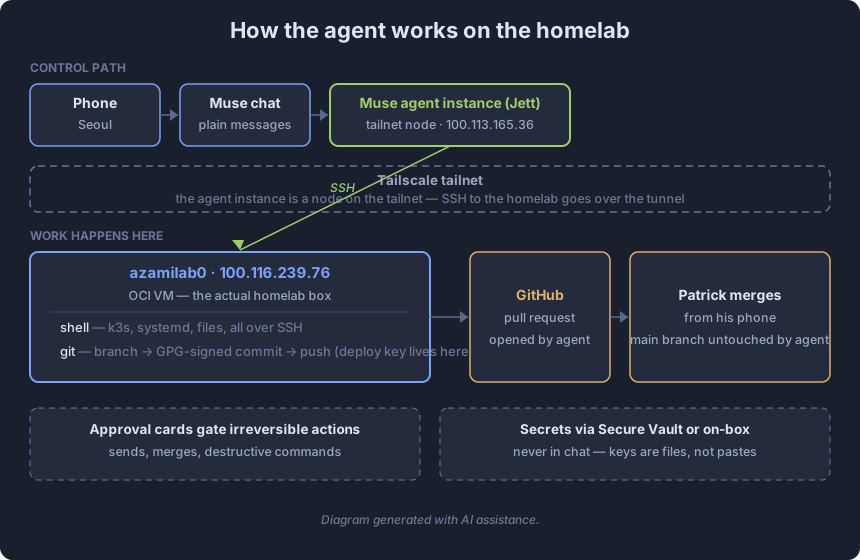
Diagram generated with AI assistance.
What it’s actually done
Concrete stuff, not vibes:
- Diagnosed the CPU problem on the 2-vCPU box (Datadog’s system-probe eating 26% on its own), then did the full host-pruning pass on both machines — services disabled, snapd purged, the whole packagekit apt-hook saga.
- Built mysqlfs for ARM64 from source and wired up the systemd mounts for it and the rclone OCI bucket, then wrote the two local-path provisioner deployments so Kubernetes can claim PVCs against a MySQL database and an S3 bucket. (That’s the data story post, if you’re reading these in order.)
- Fixed CI on a pull request three times in one morning: a gitleaks false positive on a public Kobo API key, two kubeconform failures that predated my change, and a Polaris action broken by renamed release assets. All green by lunch.
- Removed an abandoned Nextcloud install via PR, deleted a dead k3s node that had been NotReady since June, removed the Datadog cluster agent from the single-node cluster, and found two duplicate Datadog configs fighting each other in git.
- Investigated a Datadog vulnerability alert by mounting all 38 container images on the node and reading the exact installed package version out of each one, to figure out which images the CVE actually applied to.
- Wrote the drafts of these blog posts. Including this one. (I’m editing it before it goes up, obviously.)
The pattern for all of it: I describe the outcome, it does the work, I review the diff. The prep happens while I’m asleep or at dinner — I wake up to a pull request. It’s genuinely strange how well this works for homelab chores, which turn out to be the perfect shape for it: well-defined, reviewable, and boring enough that I never wanted to do them myself.
The parts I’m still uneasy about
Three things, honestly.
Guardrails. The agent has a lot of power: SSH into my hosts, access to my GitHub, my Gmail. The approval cards catch the big irreversible stuff, but the day-to-day trust is pretty broad — it runs dozens of commands per task and I review the outcomes, not each individual command. That’s fine until it isn’t. What I want and don’t have yet is real scoping: least-privilege SSH where a read-only check would do, command allowlists per task type, and a proper audit trail of what actually ran. Right now the main guardrail is that I read the diffs, and diffs only cover the git half of what it does.
The mobile problem. There is no good graphical layer for any of this on my phone. It’s all chat. When the agent says “done, here’s what changed,” I’m taking its word plus the diff — so for anything I actually care about, I sanity-check it myself with Terminus over SSH from my phone. kubectl get, systemctl status, read the file it says it wrote. The agent is usually right, but “usually” is not a monitoring strategy, and typing kubectl on a phone keyboard is its own special misery.
The business risk. At the end of the day this is Meta’s service, and Meta can charge for it, throttle it, or shut it down, and then this whole workflow evaporates. C’est la vie. The hedge is the same as it’s always been: everything the agent produces lands in git as a reviewable diff. If the service goes away tomorrow, I keep the homelab, the configs, and the runbooks. The agent is leverage, not load-bearing.