ShikataLab - The Data Story: Stretching OCI's Free Tier
Oracle’s free tier is generous with compute and weirdly stingy with disk, and that combination has shaped every storage decision in my homelab. This is the data story: what the limits actually are, the three ways I worked around them, and what’s still missing.
The problem: every gigabyte counts
The hard limit is 200GB of boot volume, total, across every instance in the tenancy. My main box (azamilab0, the k3s node) has a 153GB boot volume. The little x86 box has 47GB. That’s the whole allowance gone — there’s no attaching another block volume later without deleting something first.
And the boot volume isn’t just my data. It’s the OS, the container images k3s pulls (k3s pulls a lot of images), logs, all of it. The actual PVC data sitting on local disk is only about 5GB, but the disk pressure never really goes away: image garbage collection, log rotation, and the general background anxiety of watching df -h. So the strategy became pretty simple: keep the boot volume for the OS and container images, and push everything else — app data, media, backups — onto the other free-tier resources that would otherwise sit there doing nothing.
The inventory of things going unused:
- A MySQL HeatWave instance (MySQL.Free, 1 ECPU, 50GB of storage), completely idle
- 10GB of Object Storage with one lonely disk image in it
- The second instance’s disk, reachable over the private network
None of these is a filesystem. That was the fun part.
Tier 1: NFS from the spare box
shikatalab0 is a 1GB x86 instance whose main job these days is being a disk shelf. It runs an NFSv4-only server exporting /srv/nfs, and the k3s node talks to it through the NFS CSI driver, so pods just claim PVCs like normal.
Setting it up, on the NFS box:
apt install nfs-kernel-server
mkdir -p /srv/nfs/{k8s,media,backups}
In /etc/exports (my instances all live on 10.0.1.0/24):
/srv/nfs 10.0.1.0/24(rw,sync,no_subtree_check,no_root_squash)
Then exportfs -ra. I run NFSv4 only, which means no messing around with the v3 portmapper and friends — one port, 2049, done.
On the k3s side, install the NFS CSI driver and add a StorageClass:
apiVersion: storage.k8s.io/v1
kind: StorageClass
metadata:
  name: nfs-shikata
provisioner: nfs.csi.k8s.io
parameters:
  server: 10.0.1.233
  share: /srv/nfs/k8s
mountOptions:
  - nfsvers=4.2
One honest admission: this StorageClass isn’t in git. I created it by hand and haven’t gotten around to Flux-ifying it. It works fine, it’s just not declarative yet.
Good for: media libraries, scratch space, anything big and not latency-sensitive. Not for: databases. NFS locking and latency will ruin your day with anything that does real random I/O.
Tier 2: Object Storage via rclone
OCI’s Object Storage has an S3-compatible API, which means rclone speaks to it natively. The setup:
- In the OCI console, generate a Customer Secret Key (this is what the S3-compatible endpoint authenticates with) and note your Object Storage namespace.
- An rclone remote:
[oci]
type = s3
provider = OCI
env_auth = false
access_key_id = <your access key>
secret_access_key = <your secret key>
region = ca-toronto-1
endpoint = https://<namespace>.compat.objectstorage.ca-toronto-1.oraclecloud.com
- Mount it with a systemd service, with the VFS cache on so it behaves somewhat like a real filesystem:
rclone mount oci:BackupServerBucket /mnt/oci-bucket \
  --vfs-cache-mode full \
  --allow-other \
  --dir-cache-time 5m
The caveats matter here, so I’ll be blunt: this is FUSE over S3, not a real filesystem. No real file locking, random writes rewrite the entire object, no hard links, no atomic renames. It’s great for backups, archives, and media. It’s terrible for live databases or anything doing lots of small writes, and I don’t use it for either.
Then the Kubernetes part. k3s ships a local-path provisioner that turns a host directory into dynamic PVCs. I run a second copy of that exact provisioner (same image, rancher/local-path-provisioner:v0.0.36) with its config pointed at /mnt/oci-bucket/k8s instead, under the provisioner name rancher.io/local-path-oci, with a matching StorageClass. Claim a PVC with storageClassName: local-path-oci and the data lands in the bucket. I tested the full lifecycle — create, write, delete the PVC, watch the objects get cleaned up.
Tier 3: the MySQL filesystem (the weird one)
mysqlfs is a FUSE filesystem that stores files as rows in a MySQL database. I have a free HeatWave instance (50GB) doing nothing, so the experiment was: can MySQL be a (slow, weird) disk? I built mysqlfs v1.0.4 for ARM64 from source, created a dedicated MySQL user with grants only on one database, and mounted it with a systemd service:
mysqlfs -oallow_other -odefault_permissions \
  -ohost=10.0.1.170 -odatabase=mysqlfs -ouser=mysqlfs \
  -obig_writes /mnt/mysqlfs
The credentials live in /home/ubuntu/.my.cnf with mode 600, and that file is the only place they exist — not in git, not in my notes, nowhere else.
Measured performance: about 3MB/s on writes in my testing, with data surviving a remount byte-identical. It’s slow. I would never keep anything I care about on it as the only copy, and I wouldn’t run a database on it (a database on a filesystem on a database is where I draw the line). But for cold storage on storage that was otherwise idle, it’s free real estate.
The gotchas, for anyone else attempting this particular bad idea:
- The mountpoint has to be empty and owned by the mounting user, or the mount just fails at you
- You need
user_allow_otherin/etc/fuse.confor theallow_otherflag does nothing - Do not NFS-export a FUSE mount. The kernel does not enjoy that, and neither will you
- Never use it as the sole copy of anything important. It’s a MySQL database pretending to be a disk. Respect the bit.
And yes, there’s a third provisioner for it too: local-path-mysqlfs, same pattern, pointed at /mnt/mysqlfs/k8s. Three storage classes, three backends, one very confused little cluster:
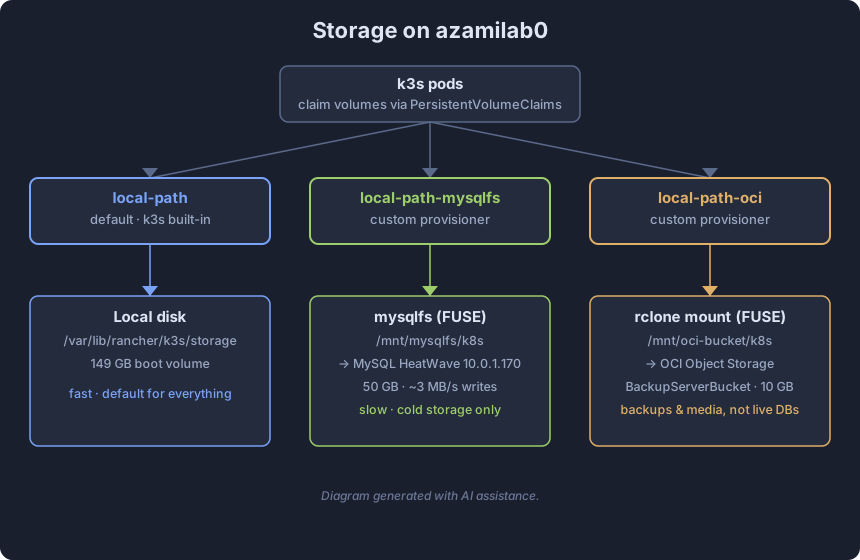
Diagram generated with AI assistance.
What’s next: a real backup tier
Here’s the honest part: everything above is primary storage. What I haven’t built yet is the second tier — actual backups that live outside the disks they’re backing up. That’s the actual important project, and half the reason I wired up the object storage in the first place.
The plan: a nightly Kubernetes CronJob that snapshots the local-path volumes and takes a mysqldump of the app database, then pushes everything encrypted and deduplicated into Object Storage. I’m leaning toward Kopia for this — it has zero idle footprint, which matters on a 2-vCPU box that’s already busy, and it does encrypted, compressed, deduplicated snapshots with real retention policies. Something like 7 daily, 4 weekly, 3 monthly.
Optionally, a weekly mirror of the bucket down to the NFS box, so there’s a copy of the backups living entirely outside Oracle. Belt and suspenders.
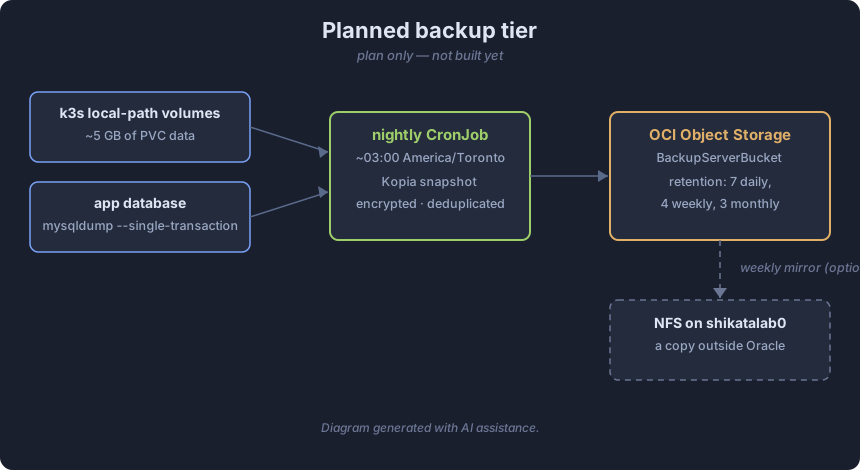
Diagram generated with AI assistance. Note: this is the plan, not built yet.
That’s the data story so far: a 200GB disk cap, three workarounds of increasing absurdity, and a backup tier that’s still on the whiteboard. The MySQL-as-a-disk thing gets the most questions, but honestly the boring NFS export is the one doing the most work day to day. As usual.